
-
×
 Kaizen Copywriting System With Dave Kaminski
1 × $15.00
Kaizen Copywriting System With Dave Kaminski
1 × $15.00 -
×
 Google Discover Playbook With Tony Hill
1 × $31.00
Google Discover Playbook With Tony Hill
1 × $31.00 -
×
 Pro Photo Editing Course by Maarten Schrader
1 × $46.00
Pro Photo Editing Course by Maarten Schrader
1 × $46.00 -
×
 The Miracle of Self Discipline Package With Brian Tracy
1 × $39.00
The Miracle of Self Discipline Package With Brian Tracy
1 × $39.00 -
×
 Unconditional Money With Becca Francis
1 × $31.00
Unconditional Money With Becca Francis
1 × $31.00 -
×
 Lightroom Masterclass Bundle Classic CC Mobile by Serge Ramelli
1 × $8.00
Lightroom Masterclass Bundle Classic CC Mobile by Serge Ramelli
1 × $8.00 -
×
 The Acquisition Bundle By Taylor Welch
1 × $69.00
The Acquisition Bundle By Taylor Welch
1 × $69.00 -
×
 Secret Spiritual Power by Steve G. Jones and John Harricharan
1 × $5.00
Secret Spiritual Power by Steve G. Jones and John Harricharan
1 × $5.00 -
×
 The Weight Class Using Energy Medicine to Fall in Love with Your Body & Achieve Your Desired Weight With Madison King, Kim Dowdell & Donna Eden
1 × $46.00
The Weight Class Using Energy Medicine to Fall in Love with Your Body & Achieve Your Desired Weight With Madison King, Kim Dowdell & Donna Eden
1 × $46.00 -
×
 Become a Prompt Engineer Go From Zero to Scripting AI Workflows!
1 × $5.00
Become a Prompt Engineer Go From Zero to Scripting AI Workflows!
1 × $5.00 -
×
 Detective Software Add-On by John Truby
1 × $23.00
Detective Software Add-On by John Truby
1 × $23.00 -
×
 Soul Alchemist With Becca Francis
1 × $23.00
Soul Alchemist With Becca Francis
1 × $23.00 -
×
 Flame Kit FX Overlays Bundle Volume 1 and 2 by PRO EDU
1 × $8.00
Flame Kit FX Overlays Bundle Volume 1 and 2 by PRO EDU
1 × $8.00 -
×
 MovNat E Course Starter Bundle Mobility And L1F With MovNat
1 × $109.00
MovNat E Course Starter Bundle Mobility And L1F With MovNat
1 × $109.00 -
×
 The TikTok And Reels Creator Course 2024 With One Peak Creative
1 × $23.00
The TikTok And Reels Creator Course 2024 With One Peak Creative
1 × $23.00 -
×
 Master Gorgeous UI Design Course by Pablo Stanley
1 × $5.00
Master Gorgeous UI Design Course by Pablo Stanley
1 × $5.00 -
×
 Mobile Editing Masterclass With Club Life Design
1 × $39.00
Mobile Editing Masterclass With Club Life Design
1 × $39.00 -
×
 The Great Tours: Experiencing Medieval Europe By Kenneth Bartlett
1 × $5.00
The Great Tours: Experiencing Medieval Europe By Kenneth Bartlett
1 × $5.00 -
×
 Instant Growth Accelerator With Ginny And Laura
1 × $23.00
Instant Growth Accelerator With Ginny And Laura
1 × $23.00 -
×
 Mental Models for Better Thinking By Rhiannon Beaubien & Shane Parrish
1 × $30.80
Mental Models for Better Thinking By Rhiannon Beaubien & Shane Parrish
1 × $30.80 -
×
 B School 2023 Summer With Marie Forleo
1 × $23.00
B School 2023 Summer With Marie Forleo
1 × $23.00 -
×
 Hypnotherapy - What Is Hypnosis by Jeremiah Rangel
1 × $5.00
Hypnotherapy - What Is Hypnosis by Jeremiah Rangel
1 × $5.00 -
×
 Juicy Relational Skills for Emergence 2023 (The Full 3-Part Online Series) With Sarah Peyton
1 × $295.00
Juicy Relational Skills for Emergence 2023 (The Full 3-Part Online Series) With Sarah Peyton
1 × $295.00 -
×
 Email Marketing Certification Program With The Smart Blogger
1 × $23.00
Email Marketing Certification Program With The Smart Blogger
1 × $23.00 -
×
 Secret Agent Persuasion by George Hutton
1 × $5.00
Secret Agent Persuasion by George Hutton
1 × $5.00 -
×
 QiYo Qigong and Yoga Online Course With Ariel Tang - White Tiger Qigong
1 × $15.00
QiYo Qigong and Yoga Online Course With Ariel Tang - White Tiger Qigong
1 × $15.00 -
×
 Mastering The Mediumship Mindset With Suzanne Giesemann The Shift Network
1 × $39.00
Mastering The Mediumship Mindset With Suzanne Giesemann The Shift Network
1 × $39.00 -
×
 Postural Blueprint For Correcting Pelvic Torsion With Stephen Dwyer
1 × $62.00
Postural Blueprint For Correcting Pelvic Torsion With Stephen Dwyer
1 × $62.00 -
×
 Movement Alchemy With the Feldenkrais Method® With Lavinia Plonka The Shift Network
1 × $54.00
Movement Alchemy With the Feldenkrais Method® With Lavinia Plonka The Shift Network
1 × $54.00 -
×
 Remote Property Lien Profits Home Study Course With Mike Warren MISU
1 × $23.00
Remote Property Lien Profits Home Study Course With Mike Warren MISU
1 × $23.00 -
×
 Continuity In A Weekend With Michael Shreeve
1 × $54.00
Continuity In A Weekend With Michael Shreeve
1 × $54.00 -
×
 Delicious Dishes for Every Taste By Bill Briwa
1 × $5.00
Delicious Dishes for Every Taste By Bill Briwa
1 × $5.00 -
×
 Omega Male Program by Paul Dobransky
1 × $5.00
Omega Male Program by Paul Dobransky
1 × $5.00 -
×
 The Launch Codes With Ben Adkins
1 × $46.00
The Launch Codes With Ben Adkins
1 × $46.00 -
×
 Ultimate MMA Fighter Champion Hypnosis by Clive Westwood
1 × $5.00
Ultimate MMA Fighter Champion Hypnosis by Clive Westwood
1 × $5.00 -
×
 Review 2019 by Renzo Gracie
1 × $6.00
Review 2019 by Renzo Gracie
1 × $6.00 -
×
 Master Mobility by Strength Side
1 × $39.00
Master Mobility by Strength Side
1 × $39.00 -
×
 Screenwriting 101: Mastering the Art of Story By Angus Fletcher
1 × $5.00
Screenwriting 101: Mastering the Art of Story By Angus Fletcher
1 × $5.00 -
×
 CopyHour By Derek Johanson
1 × $5.00
CopyHour By Derek Johanson
1 × $5.00 -
×
 Book Cover Design Course Bundle by Mandi Lynn
1 × $85.00
Book Cover Design Course Bundle by Mandi Lynn
1 × $85.00

Adobe InDesign CC: Advanced Features By Jason Hoppe
$5.00
Adobe InDesign CC: Advanced Features By Jason Hoppe – Immediate Download!
Content Proof:
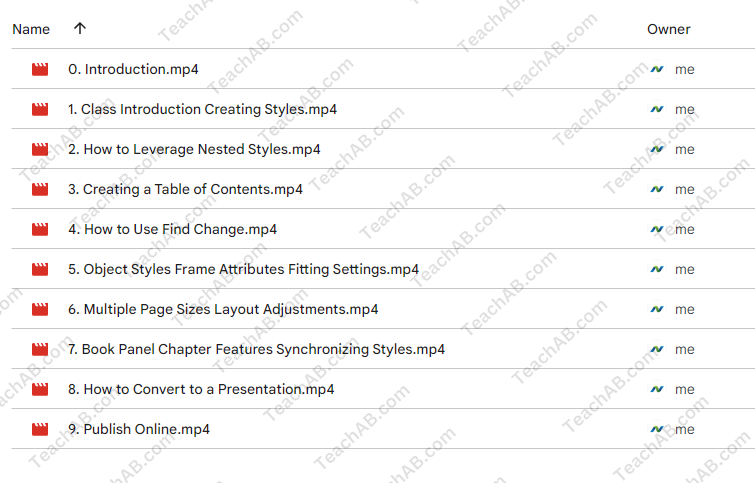
Adobe InDesign CC: Advanced Features Review
In the dynamic realm of graphic design, Adobe InDesign stands as a stalwart pillar, enabling creatives to craft stunning layouts and intricate designs. But to truly harness its power, one must dive beyond the surface knowledge often gleaned from basic tutorials. Jason Hoppe’s course, Adobe InDesign CC: Advanced Features, offers an enlightening journey for those looking to enhance their skills and unlock the software’s vast potential. With over 17 years of experience as an Adobe Certified Expert and instructor, Hoppe brings a wealth of knowledge to the table, transforming mundane learning into an exhilarating and constructive experience.
This course is meticulously crafted for individuals who already possess a fundamental understanding of InDesign but are eager to delve deeper. Participants can expect to explore a plethora of advanced techniques, paving the way for the creation of impressive layouts and the management of complex documents. Ultimately, Hoppe empowers designers to wield the full arsenal of InDesign’s tools, increasingly enhancing their design efficiency and overall quality of work. Seamlessly accessible through CreativeLive, this course invites learners to master intricate functionalities at their own pace, ensuring a personalized and engaging educational experience.
Course Overview
Advanced Techniques and Features
As we journey through the course offered by Jason Hoppe, participants will engage with a range of sophisticated techniques tailored to enhance their InDesign expertise. His approach is akin to a master chef guiding apprentice cooks through the intricacies of gourmet cuisine, teaching not only the “how” but also the “why” behind advanced functionalities. For instance, designers will learn to create visually striking layouts that captivate an audience, taking advantage of advanced grid systems and guiding principles that govern effective design.
- Creating Impressive Layouts:
- Understanding White Space: Hoppe emphasizes the importance of white space in design, comparing it to silence in music crucial for rhythm and flow.
- Utilizing Master Pages: The course dives into the leveraging of master pages for uniformity in document designs, akin to a blueprint for an architect.
- Managing Complex Documents:
- Book Feature: Hoppe demonstrates the book feature, facilitating the management of lengthy documents as if orchestrating a symphony comprised of many movements.
- Styles and Formatting: The instruction extends to utilizing paragraph and character styles to maintain consistency, providing a safety net for busy designers always on the go.
Learning Format and Accessibility
The structure of Hoppe’s course enhances the learning experience significantly. The platform, CreativeLive, not only allows seamless streaming across various devices but also fosters a flexible learning environment. Whether participants wish to attend the class during a coffee break or after a long day’s work, the choice is theirs. This flexibility is crucial; with studies indicating that self-paced learning increases retention rates and mastery of complex subjects by up to 70%, it becomes clear why this format is beneficial.
Moreover, Hoppe’s engaging teaching style simplifies intricate subjects. He often employs humor and real-world analogies, ensuring that the information is not only accessible but also memorable. For instance, when discussing asset management, he likens it to organizing a digital closet challenging but rewarding when done correctly. This approach demystifies complex topics and fosters a deeper appreciation for the craft of design.
Key Takeaways and Benefits
Enhanced Design Efficiency
One of the salient features of this course is its focus on enhancing design efficiency. Hoppe’s teachings are laced with tips that can streamline the design process, thereby allowing creatives to invest more time in innovation rather than repetitive tasks. Consider the following techniques highlighted in the course:
- Keyboard Shortcuts: Hoppe provides an extensive list of keyboard shortcuts tailored for InDesign, enabling users to navigate and command the software with fluidity and grace, much like a pianist who has mastered their instrument.
- Asset Libraries: The course delves into efficient management of asset libraries a resource that not only saves time but also enhances creativity. Designers can access a repository of colors, graphics, and styles directly at their fingertips, streamlining the entire design workflow.
Expansive Creative Toolkit
Through the advanced features presented by Hoppe, participants leave not just as users of InDesign, but as purveyors of creativity armed with a robust toolkit that can transform their design projects. The course inspires self-actualization, encouraging designers to push the boundaries of what they thought possible with the software.
- Integration with Other Adobe Software:
- Understanding how to synchronize InDesign with Photoshop and Illustrator opens new avenues for designers to create comprehensive projects rather than standalone pieces. For example, embedding Photoshop elements in an InDesign layout affords a designer more control over their visuals, leading to stunning outputs.
- Export Options:
- A significant portion of the course is devoted to mastering export settings. This area is crucial in an era where digital presentation and print outputs need to coexist harmoniously. Students learn to navigate the labyrinth of export options effectively, ensuring their designs maintain integrity no matter the medium.
Course Accessibility and Community Support
CreativeLive Access
The availability of this course through CreativeLive is both strategic and advantageous. As a platform known for its diverse educational offerings, it strengthens the value proposition of Hoppe’s teachings. Students gain access to a myriad of other classes that complement their learning journey. This community aspect fosters collaboration and the exchange of ideas among fellow designers, creating an environment rich in innovation.
- Networking Opportunities:
- Engaging with peers and industry leaders through CreativeLive opens the door for networking opportunities. Designers can share projects, receive feedback, and even collaborate, which is invaluable in an industry where fresh ideas are currency.
- Ongoing Learning:
- The course does not just stop with advanced techniques. Continuous updates and newly added content keep learners abreast of the latest Adobe innovations, ensuring their skills remain relevant in the ever-evolving landscape of design.
Expert Instruction by Jason Hoppe
With Jason Hoppe steering the course, learners benefit from a seasoned expert who not only teaches but inspires. His extensive background in high-end production, photo retouching, and creative workflow provides an authentic learning experience that transcends mere classroom instruction.
- Engaging Teaching Style:
- Hoppe’s charismatic approach makes the course enjoyable, allowing for a seamless blend of education and entertainment. His engaging delivery captures attention, ensuring that participants remain invested in their learning journey.
- Real-World Experience:
- The course is peppered with real-world examples and case studies, enriching the curriculum with practical knowledge that students can immediately apply. This practical application succeeds in bridging the gap between theory and practice, enhancing the learning experience holistically.
Conclusion
In conclusion, Adobe InDesign CC: Advanced Features by Jason Hoppe emerges as an invaluable resource for aspiring and established designers alike. The course artfully balances technical prowess and creative exploration, ensuring attendees walk away empowered with enhanced skills and a deeper understanding of Adobe InDesign’s advanced functionalities.
With lessons rooted in real-world experience, a flexible learning format, and a focus on community engagement, Hoppe’s instruction resonates with designers eager to push the boundaries of their creativity. This course is not merely an introduction to advanced features; it is a transformative experience that challenges participants to elevate their work to extraordinary levels. If you are looking to refine your InDesign capabilities and expand your creative toolkit, this course may just be the key to unlocking your full potential as a designer.
Frequently Asked Questions:
Business Model Innovation: We use a group buying approach that enables users to split expenses and get discounted access to well-liked courses. Despite worries regarding distribution strategies from content creators, this strategy helps people with low incomes.
Legal Aspects: There are many intricate questions around the legality of our actions. There are no explicit resale restrictions mentioned at the time of purchase, even though we do not have the course developers’ express consent to redistribute their content. This uncertainty gives us the chance to offer reasonably priced instructional materials.
Quality Control: We make certain that every course resource we buy is the exact same as what the authors themselves provide. It’s crucial to realize, nevertheless, that we are not authorized suppliers. Therefore, our products do not consist of:
– Live coaching calls or sessions with the course author.
– Access to exclusive author-controlled groups or portals.
– Membership in private forums.
– Direct email support from the author or their team.
We aim to reduce the cost barrier in education by offering these courses independently, without the premium services available through official channels. We appreciate your understanding of our unique approach
Be the first to review “Adobe InDesign CC: Advanced Features By Jason Hoppe”
You must be logged in to post a review.
Related products

$5.00

$78.00

$23.00

$15.00
$85.00

$39.00

Design
$69.00


$5.00

Reviews
There are no reviews yet.